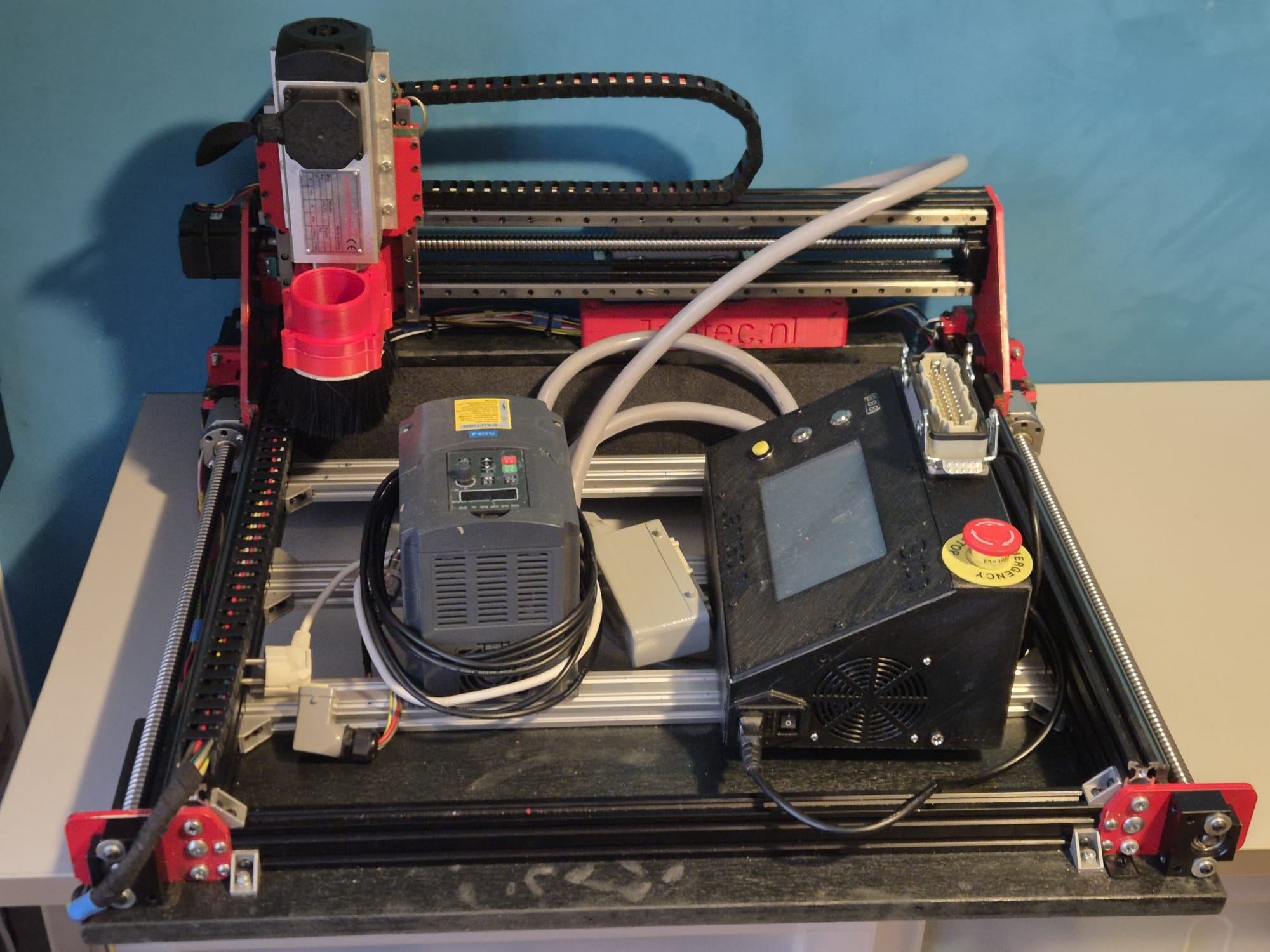
Just ordered me a new case for the Indymill’s electronics from Thomann.de.
The idea is to get everything mounted in the cases, and use the control case with the lid open. The control case gets connected to the Indymill case with multicables and – connectors. When not used, the cables get disconnected from the Indymill and from the control case and go in the Indymill’s case. The electronics controls will be mounted in the lower part of the control case and the connectors are placed on top of the control panel that gets mounted flush with the top rails of the bottom part of the controller’s flighcase. When closed, everything is neatly stored and can be transported damage-free.
I intend to store the controller case inside the Indymill case, but when moving it around the controller case will be separated from the Indymill case to prevent any possible damage to the mill.
And this is the front I designed for the controller flightcase. Right are the connectors and switches. I can use either the big multiconnector or the standard 4-pol round connectors for increased compatibility with other CNC machines.. The green face is for my Samsung Note10 (8 inch) tablet.
This is only the lower part of the newly built flightcase for the Indymill. It is 15cm high, 75 cm deep and 80 cm wide, all measured on the inside.
The top of the case is 22 cm high on the inside and it will get perspex windows at the front and top. Wheels will get mounted at the rear so the case can be moved standing upright.
The Indymill will be mounted in rubbers underneath and on the sides of the frame. The connectors to the electronics will be mounted in flightcase shells at the front. When all is positioned correctly and connected, the Indymill will be placed in my garage where I will use it in my large(r) shop.
With the 1.5 Kw spindle I intend to mill aluminium and brass, but mainly aluminium.
1st Job will be to machine ‘flat’ the 8mm aluminium plate I have bought some time ago for the heated bed of my Voron 3d printer. The plate is 310x310mm wide and was not entirely flat when I received it, due to the way it was stamped instead of saw’d. Now, I will be able to get it done right. I will use the boring head from my other mill to get this done. My other mill can only work with smaller objects, not anything as large like the Indymill can handle.
One of the 2nd floor bedrooms was converted into my 3.5×2 meters mini in-house workshop… The garage is used for my larger machines like the lathes, milling- and welding machines, laser cutter et cetera…
The Indymill’s Z-axis uses a lead screw by design , and not a ballscrew as I would like. But- that will be changed later.
For now, the lead screw solution will be OK because I will first build the Indymill machine and use the 500 Watt DC engine I already have for my CNC3018 setup.
The leadscrew of the Indymill is an 8mm leadscrew with a brass nut mounted in a 3d printed part that is mounted on the vertical rear of the Z-plate.
And- the drive stepper motor is mounted hanging on a horizontal plate on top of the Z-plate.
The required motion is exchanged to the leadscrew with a pair of 8x10x22 treehed wheels that are coupled with a GT2-10 mm wide 200 mm long belt.
The change I made to the original setup is to use an original 8mm lead screw bearing on top, under the horizontal plate.
I did not particularly like the original setup with an 8mm bearing in a 3d printed holder, and an 8 mm lockup ring under and above this bearing.
I had to machine the pro-bearing to fit the Indymill’s mounting holes and get the threaded drive screw nicely centered.
On top you see the X-axis, still without mounted linear rails but the 1605 screw is loosely mounted. The red connecting piece for the Z-axis is on the ball bearing nut. the black part on the left between the 2 lengths of 2040 aluminium extrusions is the (anti-) push/pull bearing block that holds an axial (up/down/left/right) and a radial (left/right) bearing but can not withstand any real big lateral force (L-R)
Under construction-still trying to find out how to do this.
I intend to use the same method as with the Y-axes so drop the 3d printed parts as much as possible and re-use the available bearing blocks and nut holder.
For the red nut holder I only need to make a flat extension plate to connect the nut holder to the Z-plate.
For the end bearing block BF12 to the right, this is no problem. I can mount it easily on the sideplate’s outside.
The push/pull bearing block BK12 is more difficult to re-use, I will try and find a small enough connection block that is 3d printable to shape the BK12 in, and still fits in between the 2 horizontal aluminium profiles that shape the X-axis. It will be very tight so I might have to make something myself, possibly I will just mount the BK12 on a in-between piece of 2040 and first I can mill a hole in the center of the 2040 piece so the end of the 1605 ball bearing screw can gain access to the BK12… Or something like this, will try and report how it goes later!
2021-5-24: Found a possible solution with an adaption of the same Nema23 to BK12 housing as is used for the Y axis. I am printing this fast with PLA on the Ender pro, will cut off some flesh of the NEMA23 top and bottom flange and will then fit this between the 2 lengths of 2040 extrusions and see how it works! The screw holes will have to be saved, but 4cm in the center will be removed, some 4 mm wide om both top and bottom.
Today I made the last solution fit the X axis and got all related components to fit the X-axis. During this I found that the left bottom ball bearing slider cannot move along the BK12 block.. So, I machined some material from this block’s side bottom. That doesn’t hurt but it does impact my planning a bit. And- during the process I destroyed a piece of the PETG BK12 holder that connects the BK12 bearing block to the stepper motor and the in-between side plate. I already directly printed a new ABS part to replace the PETG and wished I had started with ABS like I dit with the Y-axes. But- look at the bright side: Now all 3d printed parts will be ABS red: like the steel plates!
You must know that I elaborated quite a lot on how to print the Neam to BK12 couplers and fount that it is not good to print these withh the face to the Nema23 motor DOWN. Instead- I printed them flat, with the side that faces the stepper motor to any side but down or up. This gives great strength to the 2 pieces that carry the mounting holes for the BK12 bearing so they won’t break during use.
And I found that ABS in my case (both ABS red and PETG vblack are Sunlu products) works better for this build because the PEG breaks under strain and ABS flexes a little but does nor break..
In this post, you can see how I changed the original Indymill to more rigidity by using the original 1605 aluminium nut holders for the 1605 ball bearing screws of the Y axis, and how I made use of the BK12 and BF12 ball bearing blocks instead of the 3d printed parts like in the original build.
Yesterday 2021 05 22 I cut the aluminium profiles that are required for the frame of the Indymill. My metalsaw is set at the perfect 90 degrees angle that you need for these aluminium extrusionsToday I put the frame parts together, based on the changes that I made to the ball screw holder block and to the screw bearings and -holders. And- overnight I spraypainted all metal parts red. Used just what was lying around.Left side, left is the Nema23 motor, and the BK12 bearing block is now connected to the engine plate with an ABS sideways printed connecting piece. ( I found the PETG printed parts I made earlier to break on the sleeve at the left when applying force, so I went for ABS and I printed it as you see here with supports to give strenghth for the bolts and nuts.) To the right, the aluminium nut holder is placed. This has been milled down and new screw holes were made in the holder and plate to connect it to the plate (see the text later in this post)same treatment on the right hand sideOverview of the RH side with the end bearing and -block, connected to the front plate bearing holder. I milled additional holes in the bearing blocks (front L&R) to (re-) use the tapped M5 holes that are already in the red connecting plate
When building the frame, make sure that you do not initially screw anything tight. Follow the steps that apply to any build:
Make the footprint square by measuring either with a good 90 degrees angled measuring hook OR measure the diagonals against each other and make them alike. Then, tighten all corner screws .
Re-measure the footprint’s left against right length and also front/rear length. If there is any difference here, a) take everything apart and b) make sure you have equal sizes for your build where this is required. OR, if you have a non-standard build, make sure you build according to specs sizes. The, do 1. again.
For a lineair rail: use a ruler that is specifically made for your type of rail You can 3d print one or buy two aluminium ones. ALWAYS use at least 2 rulers! With the rulers in place at 20% from left and 20% from the right, after you have installed the rail loosely with the screw in the nuts, tighten the screw a bit but not too stiff.. We will get back to these screws at a later stage.
Put the connecting piece on the motor’s axle (8mm side) and tighten this well. Preferably, use some loctite on the axle but don’t overdo it. Be aware that you need to testfit the BK12 first. make sure that the connecting piece almost touches the BK12’s nut!
Put the stepper motor and the BK12 connector together, using the 3d printed thin NEMA23 adapter plate between motor and steel plate. Do not yet tighten this too much.
Make an original aluminium 1605 nut holder block shorter to fit exactly. See the picture.
Fit the aluminium nut holder block including the entire assembly of the 600 mm long 1605 ball bearing screw on the machine, and superglue the block in the correct position. Let it dry so it won/t come off. Demount verything except the steel sideplate and the glued aluminium nut holder.
clamp the nut holder to the steel plate with a grip vice, just to make sure it all keeps together.
Drill 3 new 4mm holes through the steel plate’s lower part , drill through the aluminium block as far as possible. 2 holes on the lower side and 1 just between 2 of the top 3 holes, NOT where the existing hole of the aluminium nut holder block exists.
Get the nut holder block loose, if it has not already come off.
Tap M5 in the holes of the nut holder block. You will have come through the big center hole (for the nut) with 2 holes, make sure this gets cleaned up on the inside.
Drill the new holes in the sideplates with 5.5 mm drill (to give you mounting clearance)
Place the sideplate on the 2 bearing blocks of the linear rail with 4 outer M3 x8 (or x10) screws.
Put everything loosely together
Mill an end baring block to fit the 1605 ‘s screw end at the front an mount this at the exact center of the small front plate.
Now, connect your nema 23 engine to a motor steering device so you can test the setup. First, turn the screw by hand and it should run smooth.
Since you want to have an even height of the side plates, do not alter these unless it needs to be done on both sides equally.
Your fixation point is the only non-movable position, at the rear of the frame.
Move the carriage to the rear and now, see if you have slack on the M3 screws of the slide bearings AND on of the 3x M5 screw the rear of the aluminium nut holder. If so, first tighten the M3 screws. Then tighten the M5 screws. If not, loosen ALL of the linear rails screws ans move the rail a little. If this is possible, tighten the M3 screws of the linear rail’s bearing blocks. Then, try to get as much clearance on the linear rail’s movement up/down as you can and tighten the 3x M5 screws of the nut holder block.
Now, tighten 1 screw only of the linear rail, at the position above the nut holder.
Move the carriage entirely forward position.
Tighten the linear rail’s M3 screw that is exactly in position above the nut holder (of the ball bearing screw)
Now, tighten all screws of the linear rail.
You’re done!
Check the other side and if the linear rail’s height differs from the other side, the only thing to do is to start over again, where your slack is in the 5.5 mm holes of the steel plate’s screw holes for the nut block. If you play with this, and then adjust the linear rail’s height, you can get it all even. At least’eventually I got mine right but it took some time. Have fun!
Things to bear in mind: You don’t want anything out of parallel like a linear rail that is uneven to the aluminium profile on which it is mounted or a ball bearing screw that gets under tension. There is also another way to see what is happening while you are tweaking the hardware/frame: take the front bearing off and see what happens to the end of your ball bearing screw in the hole up front when you move the carriage. It can tell you much about what is happening… It should always stay perfectly centered but I’ve seen it up, down and all other directions.. -)
After making the base frame and the Y axes, the rest is more simple. Just get the 2040 pieces in place, I started with only the lower one. The put all in like the rails, the ball bearin screw bearings, the ball bearing screw, coupler between screw an motor, the stepper motor and the X axis is done.After the X axis, the Z axis is placed in. First put the rear plate on the 4 linear rail sliders and mount the ball crew block of the X axis to the rear. Then, put the vertical short MGN12 rails on the rear Z plate. Then put the bearing for the leadscrew on the top plate’s undernetah. Put the corner pieces on the top plate and mount it on top of the rear Z plate. Then, feed the threaded rod through the top bearing, mount the angine an d teethed wheels and feed the screw through the nut… Are you still with me?Top view to get it more visble: engine and leadscrew connected with teethed beltI decided to put 3 connecting pieces between the frame’s left and right Y axes to maintain stability and rigidity. After I put these in, the frame was very square and stabele, but also heavier..)
Last time that you see the frame without any wire. Next I will get the endswitches on the farme, the spindle and all other parts that are required to get my Indymill up and running! BTW I mounted 4 heavy purpose rubber feet under the frame, just to prevent having any tordoial stress to the frame when I put the frame anywhere to be used.
And- I must say, this build goes quite well. The materials are OK, and the guideline from the build description was very good. Although I never use it anymore. The build is quite self-explanatory once you start building the Indymill CNC machine. I also cahnged quite some parts, and made alterations where I felt this would improve the machine to fit my purpose better.
My very basic mill is just an old drill machine with a large X-Y cross table mounted underneath. But- for basic milling it works.
In the process of change: My HBM25 lathe is going to be changed (temporarily) to act as mill. I need some parts milled flat and square, this will do that. Waiting for the MK4 sleeve for my MK3 milling head…All mounted to the lathe
The required iron plates were not available in ready- to use state at the time I needed this, fortunately I could buy the plates as a kit with all of the drilled holes already in it, non-painted. And- all of the thread tapping still needed to be done. Since I am also making changes to the design of the millling machine, some holes will be altered and this is best done when the plates are not yet painted.
The raw streel for the Indymill. I put small colored circles where the thread needs to be tapped.
Rustpreventing primer spray-painted the Indymill’s iron plates
I am in the process of developing a router for my plasma cutter, since the cutter works very good but it will be way more effective once I can machine my designs with a router for this cutter.
Example of a very big X-Y design for a Plasma Router on Aliexpress
My design differs from others because i will use only existing affordable parts that require no additional machining.
Firstly, you would need a cutting table with a maze where you can put your steel on, when cutting. This maze will be enclosed with a steel box so no cutting debree will be thrown around. Around the box a set of aluminium or steel profiles will be mounted on which the wheels for the X or Y axis will be built. From here on, a normal router setup can be made.
The plasma head will need to be adjustable in height but does not neccessarily need to be CNC movable. Just a manual knob to move it up and down a little will do.
So, only 2 axis are to be made with CNC.
For the Y axis I will use a complete accessory from AliExpress with ball bearing 1604 and an effective way of 600mm, including a Nema23 stepper motor.
Y-axis 1204 ball bearing screw drive, NEMA23 stepper motor and dual linear rails. This will move the plasma head left and right. I might use something a bit simpler that this…X-axis on both sides of the box that will move simultaneously forward/backward with steppers mounted in series, the Y axis will be mounted in between.
The plasma cutter ‘head’ will get a fixed (but a bit vertical movable) mount on the mounting plate of the Y-axis.
Magnetic break-away torch mountAnd the mount for the head of the plasma cutter
The electronics will be added at the front of the Y-axis in a 3d-printable box. (or you can buy a ready-made box HERE).
Electronics will be an Arduino UNO with standard GRBL shield, or THIS as a better all-in one solution, including local router managing. At the beginning and end of each axis, a limit switch will be mounted. Switches, cabling and mounts are available on Aliexpress HERE and HERE.
Firmware for the Arduino comes from the widely available GitHub and the GRBL community. GRBL software is available for Windows PC and MAC as well. Designing can be done in any way, and the most simple way will be the online Cad solutions like Tinkercad .
The power supply for the Plasmarouter will be a 24 Vols 8 Amps portable power supply like THIS one.
In my search for the best affordable CNC motherboard for my new to build Indymill CNC machine I finally chose the GT2560 from Geeetech as best compromise. At least for now, and maybe later I may change to an RRF3 board with a good remote CNC interface like the Mellow Fly-CDY-V2.
The board has a budget price and utilizes an atmega chip with great performance.
The board does not come with the CNC GRBL firmware installed, you can get the required arduino library HERE for the Arduino Mega with the add-on RAMPS 1.6 board and HERE for the GT2560 integrated board!
The nice thing about this board is that it can be flashed with the arduino IDE, and I like the board especially because I can plug in the NEMA23 closed loop stepper motor cables directly in the driver connectors of the GT2560 board. By doing so, I don’t need the lumpy seperate 6600 driver units and I never miss a step. These closed loop drivers get attached to the rear of the Nema23 stepper motors and use the 24 Volts from the wiring to the GT2560 driver socket. The max Amps is 4 Amps per unit and this is enough to have good CNC results. I also added the tiny LCD’s into the closed loop units, this makes it possible to perform local management like the initially required one-time calibration of each stepper without the need for a PC. And= the display also shows the status of the stepper motor (errors, missed/corrected steps etc).
The required Gcode can easily be made with Esticam. I first make my design in Openscad, export the design as .STL file in the highest resolution ($Fn at 128 or higher) and import the STL file in Esticam. Then I use Esticam to send the Gcode via a USB cable in the GBRL format to the GT2560 board. BUT- it is also possible to save the CNC file output from Esticam and put it on an SD card. The LCD unit that is attached to the GT2560 accepts SD cards (formatted as FAT 32) so you can work independantly of a PC.
Or- you can connect your Mega2560 to a Raspberry PI and use the Raspberry PI as webinterface , to control your CNC machine via wifi from your PC or phone/tablet.